 Always in sync
OTA channel manager
One calendar behind every listing
Two-way sync, in practice: raise a rate or block a long weekend once, and it reaches Airbnb, MakeMyTrip, Goibibo, Booking.com and the rest as you save it. When a booking lands on any of them, the dates close everywhere else the same moment — so the double booking that ends in an awkward call to a guest simply can't happen.
Airbnb
MakeMyTrip
Goibibo
Booking.com
Agoda
Yatra
Expedia
VRBO
+ more
What you get
One calendar, every channel
Set the rate and rules for a date once. Doorloom pushes it out and pulls bookings back in.
-
Change price for any dateLong weekend coming? Tap the date, set the new rate, and it lands on every connected OTA without opening a single extranet — repricing stops being a chore you postpone
-
Block dates only on OTAs or everywhereSo you have the control of the distribution channel - your call, per date
-
Set minimum-night rulesStop a single Saturday booking from breaking up a high-demand weekend: min-stay rules apply per date and travel to every channel with the rate
-
OTA bookings come back inA booking on any channel blocks the date everywhere else, instantly
-
Multi-property, multi-unitVillas, cottages, rooms and dorms — each with its own rates and rules
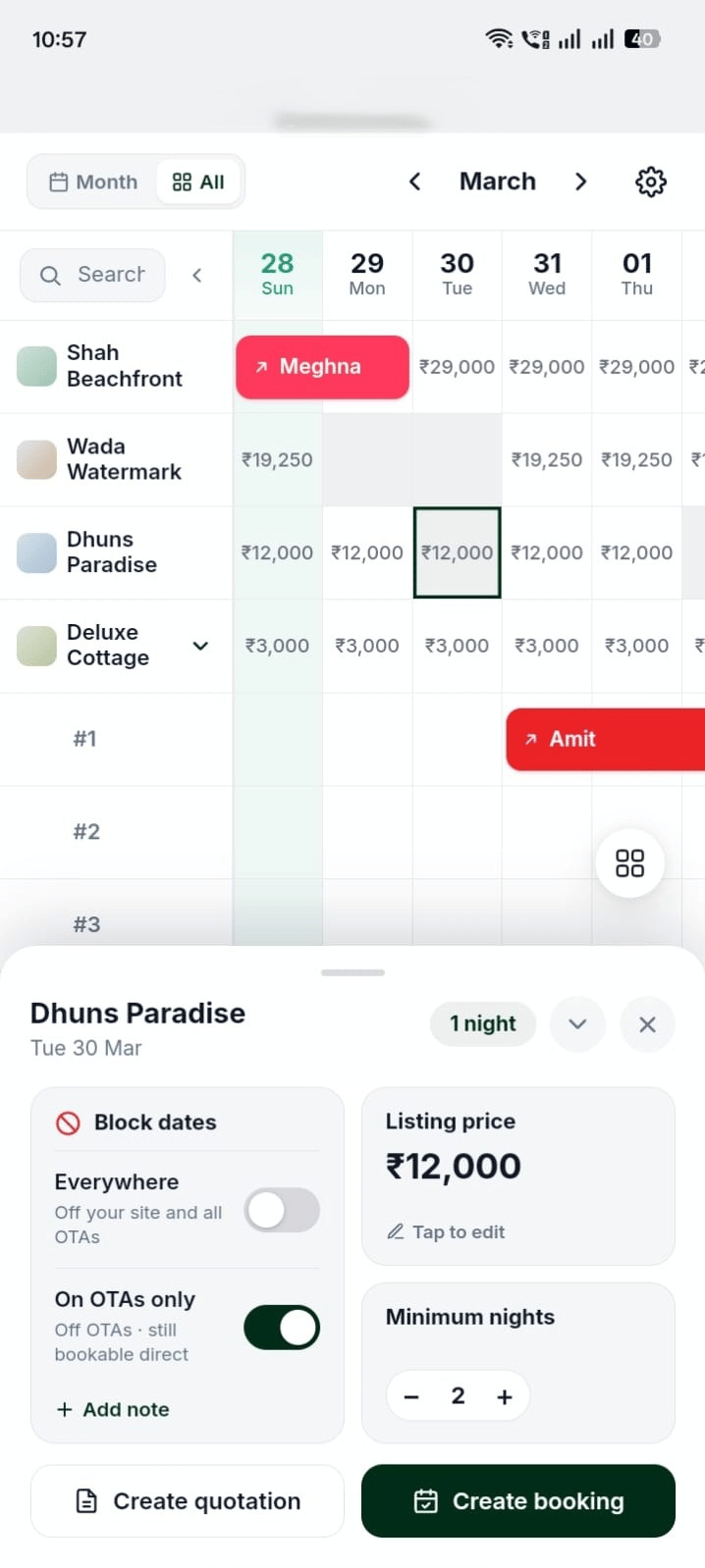
24 December
Price / night₹24,000
Block on OTAs only
Minimum nights2
Tap a date, set the rules
Price, min-nights and OTA blocks for that date — pushed to every channel
How it works
Set it once, everywhere stays right
1
Connect your channels
We help you link the OTAs you already sell on — Airbnb, MakeMyTrip, Goibibo, Booking.com, Agoda and more.
2
Set rates & rules
Per date: price, minimum nights, and whether the date is open on all channels, some, or none.
3
Doorloom syncs
Changes push out in real time. A booking from any channel pulls back in and blocks the date everywhere.
4
You stop worrying
No spreadsheet, no manual calendar updates, and no awkward call to a guest about a double booking.
Real time
Rate and availability changes reach your channels as you make them
Zero
double bookings — one date, one source of truth
Add-on
Channel manager is optional — switch it on for the units that need it
Questions
Channel manager, answered
Which OTAs are supported?
Airbnb, MakeMyTrip, Goibibo, Booking.com, Agoda, Yatra, Expedia and VRBO, with more being added. If you sell on something not listed, talk to us — we'll tell you where it stands.
Can I keep some dates for direct guests only?
Yes. Block a date on OTAs only and keep it open for direct enquiries and your own website — useful for peak dates you'd rather sell commission-free.
Do my existing OTA listings stay as they are?
Yes. Your listings, photos and reviews stay where they are. Doorloom takes over price and availability so they always match your real calendar.
Is the channel manager included in the price?
It's an optional add-on, priced per unit. Use the pricing calculator to see the exact monthly cost with it switched on.
Explore more
The rest of Doorloom
Built for your property type
Let's talk
Need help connecting your channels?
Tell us which OTAs you sell on and we'll link them to one synced calendar with you, step by step